

Accessibility
Screen readers
Section titled “Screen readers”On macOS, VoiceOver reads the terminal as a text area: the text on screen, by character and by line, the cursor position, the selection, and changes as they happen, coalesced so a busy program does not flood speech. The pane’s title is its label.
The text-area interface does not provide a command-prompt rotor or link activation actions.
The Linux frontend exposes the same text through GTK’s accessibility interface.
Colour
Section titled “Colour”[appearance] colorblind_mode remaps the palette for deuteranopia, protanopia or tritanopia, so the red and green slots programs use for failure and success stay distinguishable. The remap applies inside the theme, so every program’s colours change together.
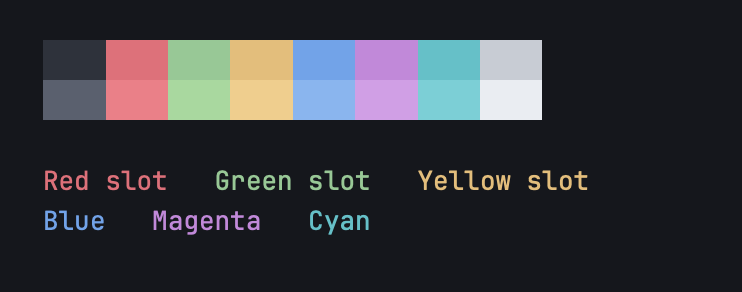
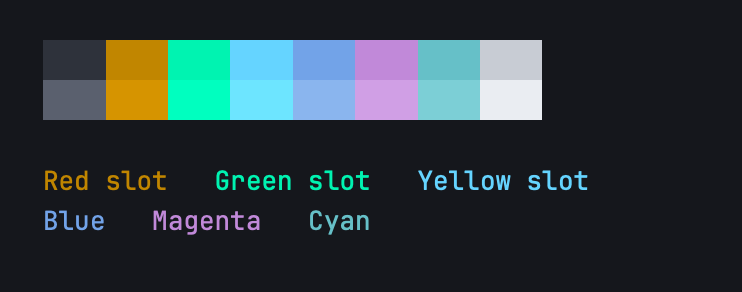
[appearance] text_contrast raises faint text against its own cell background without changing its hue. It is off by default.
Motion and transparency
Section titled “Motion and transparency”The app follows the system’s Reduce Motion setting: the cursor stops gliding between cells and interface animations stop. Reduce Transparency turns off background vibrancy. Cursor blinking is a setting ([cursor] blink).
[appearance] ui_font_scale scales the tab bar, the command palette and the settings window from half to double size, independently of the terminal font. The terminal font size is ⌘+ and ⌘−.
The Welcome screen has an Accessibility button that opens these settings.
Ubiquitty and this site are copyright © 2026 Stanislav Yaglo. Ubiquitty is licensed under the Apache License 2.0.
Apple, iPad, iPadOS, iPhone, Keychain, Mac, macOS, Metal, Swift and Xcode are trademarks of Apple Inc., registered in the U.S. and other countries and regions.